Start infrastructure
PostgreSQL and the optional RabbitMQ broker run in Docker.
Event processing platform
Tengen accepts business events over HTTP or RabbitMQ, evaluates them against configurable rules, and delivers durable webhook actions. This guide covers the complete console workflow from the first event to production operations.
01 / Start here
Run the supporting services, start the two application layers, and create the first event-processing workflow.
PostgreSQL and the optional RabbitMQ broker run in Docker.
Run the Spring Boot backend and Next.js admin console separately.
Create an API key, create a rule, then send a JSON event.
docker compose -f tengen/docker-compose.yml --profile rabbitmq up -d db rabbitmqcd tengen
./mvnw spring-boot:runcd frontend
npm ci
npm run dev| Service | Local address | Purpose |
|---|---|---|
| Admin console | http://localhost:3000 | Rules, events, deliveries, replay, connectors, keys, and settings. |
| Backend API | http://localhost:8080 | Event ingestion and admin API. |
| RabbitMQ AMQP | localhost:5672 | Optional broker connection. |
| RabbitMQ management | http://localhost:15672 | Local broker administration; defaults are tengen / tengen. |
admin / admin. Change ADMIN_PASSWORD, JWT_SECRET, and WEBHOOK_SIGNING_SECRET before using the application outside local development.data.amount >= 1000 as the condition.02 / Understand the model
Everything in Tengen is organized around an event envelope, a rule revision, and a durable action outcome.
| Field | Required | Meaning |
|---|---|---|
type | Yes | Business event name, such as payment or login.failed. |
source | Yes | Producer or domain name, such as billing or identity. |
timestamp | No | Event time as an ISO-8601 timestamp. If omitted, Tengen uses the current time. |
data | Yes | JSON object containing business fields used by conditions, aggregates, grouping, and sequence correlation. |
{
  "type": "payment",
  "source": "billing",
  "timestamp": "2026-08-04T14:30:00Z",
  "data": {
    "amount": 2500,
    "currency": "PHP",
    "country": "PH",
    "userId": "user-123"
  }
}HTTP requests use an API key. RabbitMQ uses the API key saved on the connector.
Tengen compares the event time with a durable watermark for its type and source.
The event and its origin are saved before the processing result is returned.
Active, valid rules evaluate the event, aggregate state, sequence progress, or absence state.
Eligible webhooks are written to a durable outbox and delivered by a worker.
Event Explorer records matches, queued actions, suppressions, and linked delivery records.
03 / Find your way around
The sidebar keeps the main operational areas in one place. Use the screenshots as a quick visual map.
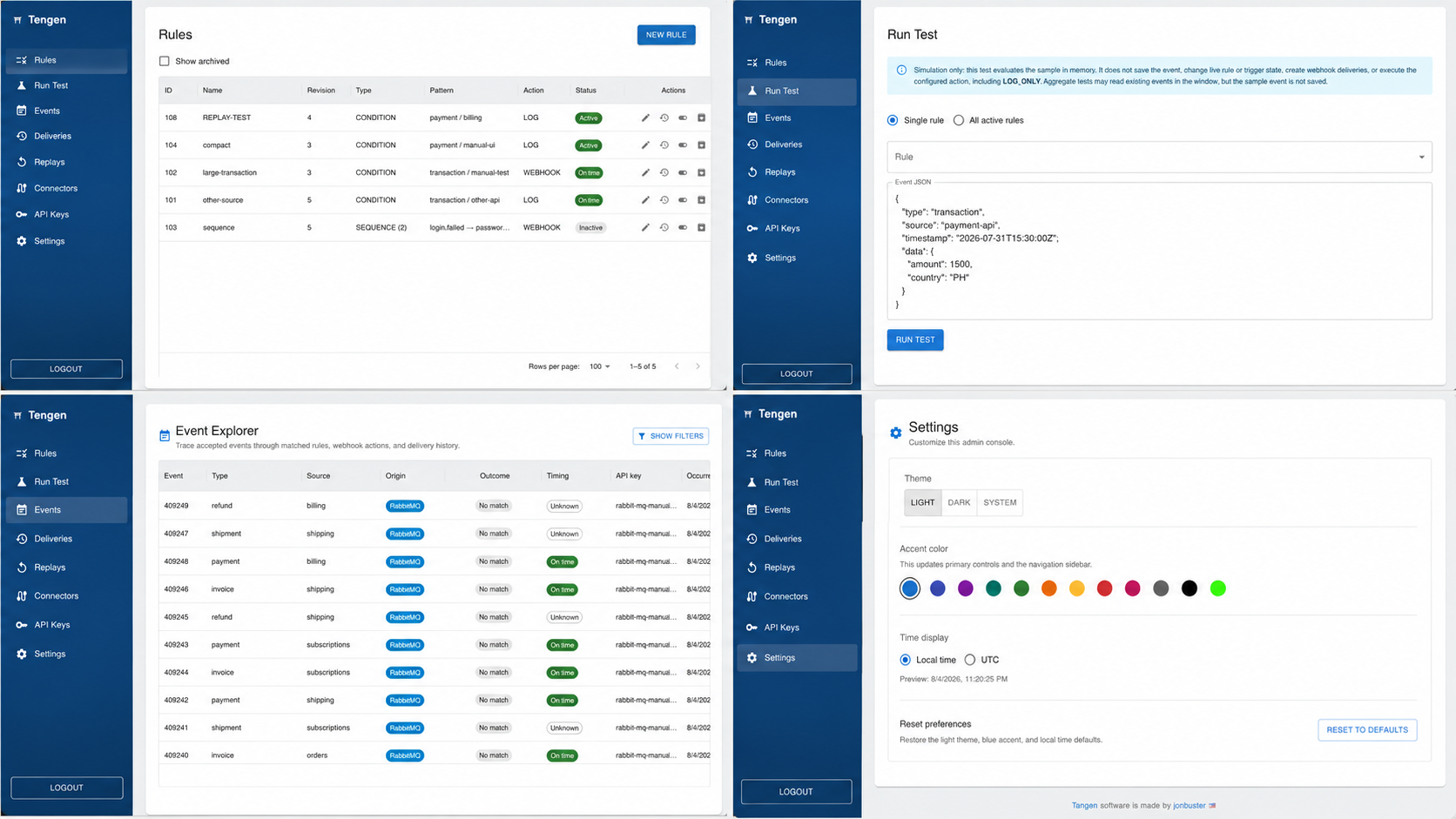
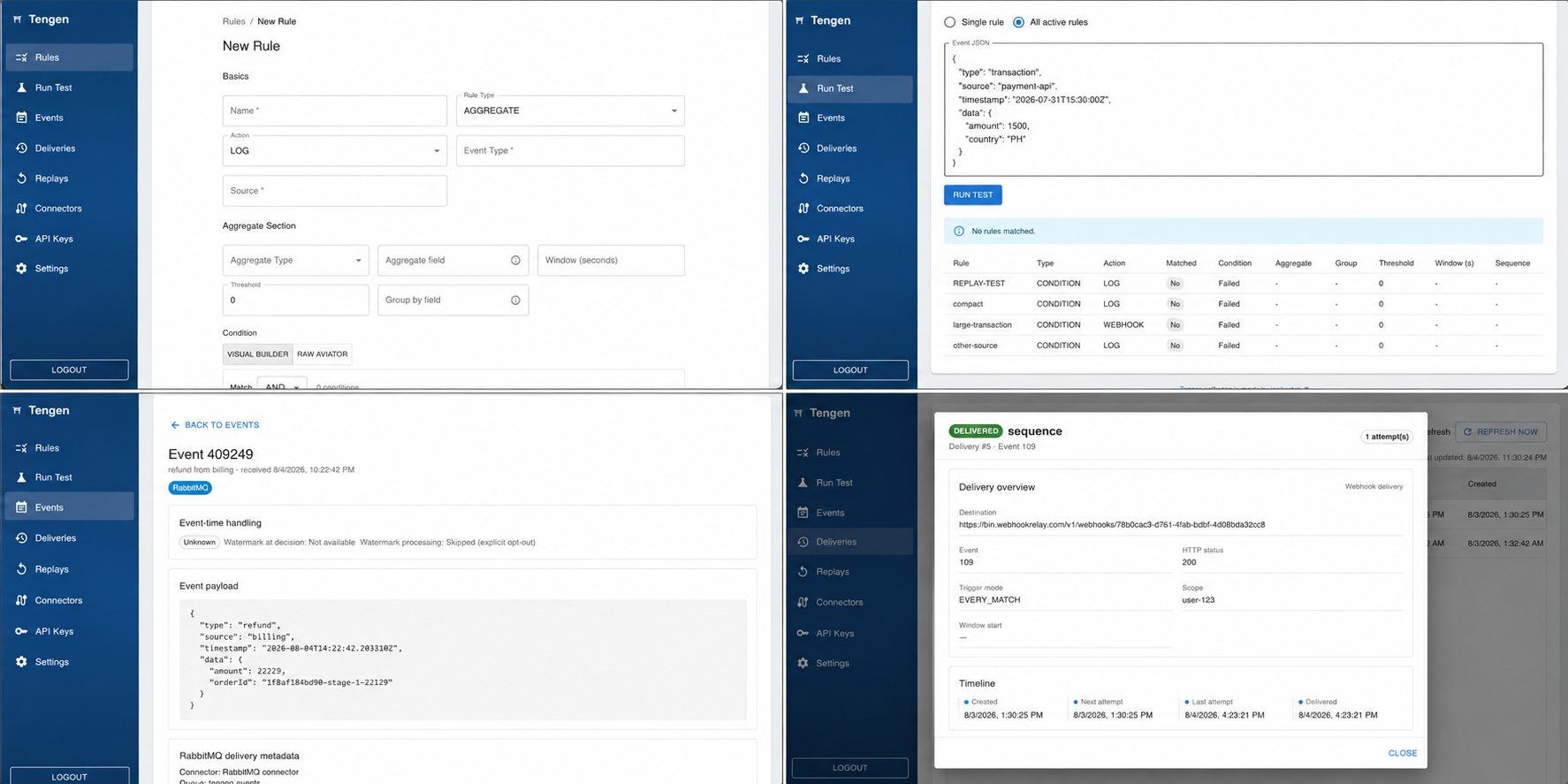
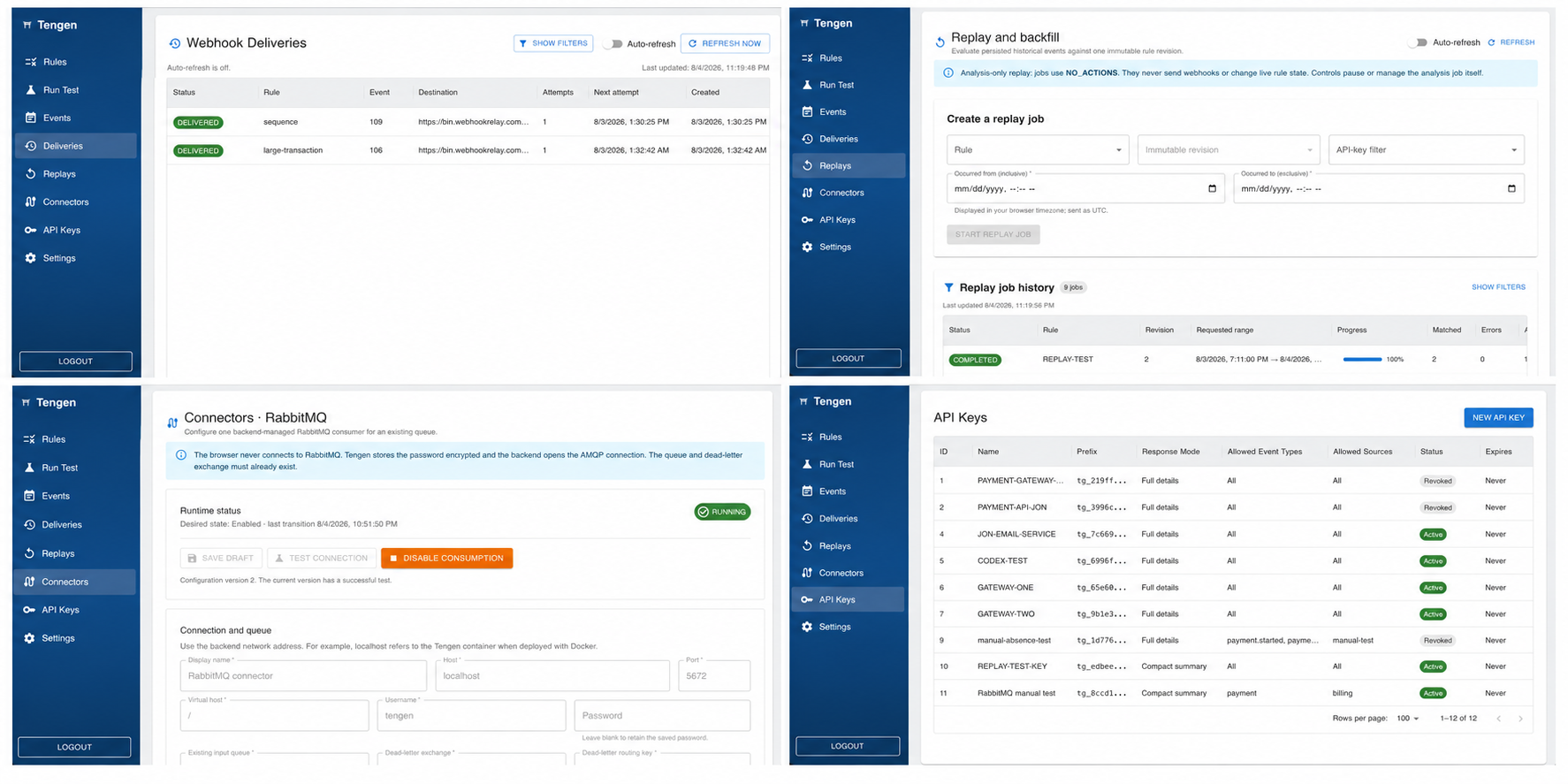
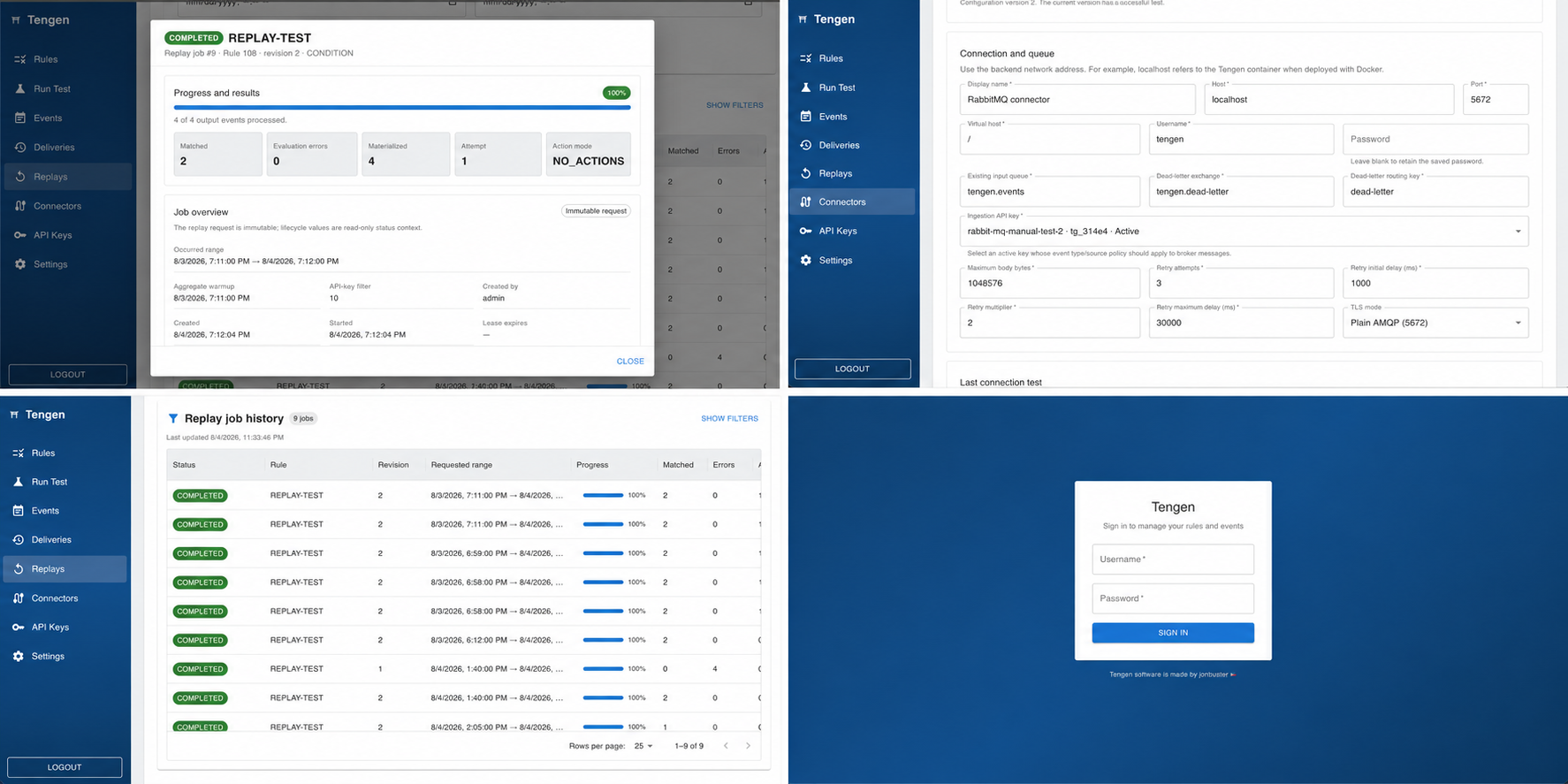
04 / Ingest events
Use POST /api/events when an application or service can make an HTTP request for each event.
tg_... key immediately. It is shown only once; Tengen stores only its hash.curl -X POST http://localhost:8080/api/events \
-H "Content-Type: application/json" \
-H "X-API-Key: tg_your_raw_key" \
-H "Idempotency-Key: payment-123" \
-d '{
"type": "payment",
"source": "billing",
"timestamp": "2026-08-04T14:30:00Z",
"data": {
"amount": 2500,
"country": "PH"
}
}'Every accepted request returns HTTP 200. The response mode belongs to the API key, so processing is always complete even when the producer receives a compact projection.
{
  "status": "accepted",
  "matched": true,
  "rules": ["large-payment"],
  "queuedRules": [],
  "suppressedRules": [],
  "eventTimeStatus": "ON_TIME"
}{
"event": { "type": "payment", "source": "billing", "data": { "amount": 2500 } },
"status": "accepted",
"matched": true,
"rules": ["large-payment"],
"queuedRules": ["large-payment"],
"aggregates": {},
"sequences": {},
"suppressedRules": [],
"eventTimeStatus": "ON_TIME"
}Use one idempotency key for each logical event. The key is scoped to the API key that sent it.
| Situation | Result |
|---|---|
| Same key and equivalent payload | The original completed response is returned. The event is not processed twice. |
| Same key with a different payload | 409 Conflict; the key cannot be reused for another event. |
| Same key while the first request is processing | 409 Conflict; retry after the first request completes. |
| New request | X-Idempotency-Replayed: false. |
| Completed replay | X-Idempotency-Replayed: true. |
401; an authenticated key used outside its allowed event type or source scope returns 403.INGESTION_MAX_BODY_BYTES (1 MiB by default).INGESTION_RATE_LIMIT_PER_MINUTE (600 by default). A limited request returns 429 and a Retry-After header.type and source are required; data must be a JSON object.05 / Ingest events
Use the RabbitMQ connector when producers already publish to a broker or when ingestion should be asynchronous and decoupled from the producer request.
docker compose -f tengen/docker-compose.yml --profile rabbitmq up -d db rabbitmqFor the local Compose broker, the AMQP port is 5672, the management UI is 15672, and the default credentials are tengen / tengen.
tengen.input       --events------> tengen.events
tengen.dead-letter --dead-letter-> tengen.events.dlq| Connector field | What to enter |
|---|---|
| Display name | A label for the connector. |
| Host / Port | Broker address and AMQP port. Use localhost when the backend runs on the host; use the Compose service name when the backend runs in Docker. |
| Virtual host | Usually / for the local broker. |
| TLS enabled | Enable when the broker requires TLS. |
| Username / Password | Broker credentials. The password is write-only in the UI and encrypted before storage. |
| Existing input queue | The durable queue Tengen consumes. |
| Dead-letter exchange / routing key | The route used for malformed, permanently invalid, or exhausted messages. |
| Ingestion API key | An active Tengen API key. Its event type/source policy applies to RabbitMQ messages. |
| Maximum body bytes | Per-message body limit, from 1 byte to 10 MiB. |
| Retry attempts | 1 to 20 attempts for transient processing failures. |
| Retry initial delay / multiplier / maximum delay | Backoff controls for transient processing failures. |
Publish persistent UTF-8 JSON with content_type=application/json and a unique AMQP message_id. The body uses the same event envelope as HTTP ingestion.
{
  "type": "payment",
  "source": "billing",
  "timestamp": "2026-08-04T14:30:00Z",
  "data": { "amount": 2500, "country": "PH" }
}| Message condition | Connector behavior |
|---|---|
| Valid message and new message ID | Persist, evaluate, record the RabbitMQ origin, then acknowledge. |
| Repeated message ID | Use the durable receipt to deduplicate and acknowledge without creating another event. |
| Missing ID, invalid JSON, wrong content type, body too large, or scope rejection | Classify as permanent, publish to the configured dead-letter route after confirmation, then acknowledge the original. |
| Transient processing failure | Retry with the configured backoff. After retries are exhausted, publish to dead letter and acknowledge. |
| Dead-letter publish cannot be confirmed | Pause the connector so a message is not acknowledged without a confirmed dead-letter copy. |
Watermark processing is enabled by default. To explicitly opt out for one message, set the AMQP header below:
x-tengen-watermark: falsefalse values keep watermark processing enabled.06 / Stream behavior
Tengen keeps a durable watermark per event type and source so out-of-order events can be accepted without moving rule state backwards.
The watermark is based on the highest observed event time minus the allowed lateness period. The default grace period is 300 seconds, controlled by INGESTION_ALLOWED_LATENESS_SECONDS.
07 / Build rules
Rules are named, versioned configurations that turn event patterns into log records or webhook actions.
| Field | Used by | Guidance |
|---|---|---|
| Name | All | Unique human-readable identifier. |
| Action | All | LOG or WEBHOOK. |
| Event type / source | Condition, aggregate, absence start | Exact string pre-filter before the Aviator condition runs. |
| Condition | Condition, aggregate, absence start | Visual Builder or raw Aviator expression. |
| Threshold | Aggregate | The rule matches when the calculated value is greater than or equal to this number. |
| Window (seconds) | Aggregate, sequence, absence | Event-time window. It must be positive for these rule types. |
| Group by field | Aggregate, sequence, absence | Optional dotted path such as data.userId. Blank means global state. |
| Active | All | Only active, non-archived, valid rules participate in live evaluation. |
The visual builder creates an Aviator expression. Use groups to combine conditions with AND or OR. Each leaf has a field, operator, and value.
==equals
!=not equal
>greater than
>=greater or equal
<less than
<=less or equal
containsstring contains
not containsstring does not contain
The event environment also exposes the complete data object, so raw Aviator can reference other fields.
data.amount >= 1000 && data.country == 'PH'Raw expressions are validated by Aviator before the rule is saved or activated. The default maximum expression length is 10,000 characters.
08 / Rule type
A condition rule matches one event after its exact type/source pre-filter and Aviator expression both pass.
| Field | Value |
|---|---|
| Name | large-payment |
| Rule type | CONDITION |
| Event type | payment |
| Source | billing |
| Condition | data.amount >= 1000 && data.currency == 'PHP' |
| Action | WEBHOOK or LOG |
09 / Rule type
An aggregate rule calculates a value over a moving event-time window and matches when that value reaches its threshold.
AGGREGATE as the rule type.COUNT does not need an aggregate field; the other functions require a numeric dotted path such as data.amount.ONCE_PER_WINDOW when a webhook should be reserved once per fixed event-time bucket rather than once for every matching event.Rule type: AGGREGATE
Event type: login.failed
Source: identity
Aggregate: COUNT
Window: 300 seconds
Threshold: 5
Group by: data.userIdThe lower time boundary is excluded and the current event is included. A sum, average, minimum, or maximum ignores events whose aggregate field is not numeric. A grouped aggregate with no usable group key does not produce a grouped match.
10 / Rule type
A sequence rule detects two to five ordered event steps completed within one event-time window.
SEQUENCE as the rule type.data.orderId or data.userId. Every step must resolve to the same value for correlation.LOG or WEBHOOK. Sequence webhooks use EVERY_MATCH; the edge and once-per-window trigger modes are not available for sequence rules.data.orderId != nildata.status == 'paid'data.orderId != nil11 / Rule type
An absence rule opens an expectation when a starting event matches, then triggers only if the expected event does not arrive before the event-time deadline.
data.orderId.EVERY_MATCH; use cooldown to reduce repeated delivery when necessary.12 / Validate safely
The Run Test page simulates rule evaluation without creating live processing side effects.
LOG or WEBHOOK.13 / Manage change
Rule changes are auditable and revisioned. The current rule is a projection; the revision history is immutable.
Creates revision 1 after validation.
Creates a new revision and resets runtime state for the changed configuration.
Only valid, non-archived rules can be activated.
Stops live evaluation without deleting the rule or its history.
The delete route archives the rule and deactivates it.
Copies an older snapshot into a new revision and starts it inactive.
Updating, activating, deactivating, archiving, unarchiving, or restoring a rule clears action cooldown/window state and cancels active sequence or pending absence instances for that rule. This prevents a new configuration from inheriting progress from an older revision.
If-Match when you want a mutation to fail instead of overwriting a newer change.14 / Trigger actions
Webhook actions are asynchronous. Tengen commits the event and the delivery intent before the worker makes the outbound request.
WEBHOOK in the rule action field.| Trigger mode | Available for | Behavior |
|---|---|---|
EVERY_MATCH | All rule types | Queues one logical webhook for every eligible match. |
EDGE | Condition and aggregate rules | Queues only when the rule changes from not matching to matching. A later non-match resets the edge. |
ONCE_PER_WINDOW | Aggregate rules only | Reserves at most one webhook per fixed event-time window and group. A failed delivery can retry. |
| Cooldown | Webhook rules | Suppresses repeated delivery for a configured period per group or globally. It does not change match evaluation. |
Tengen validates the URL when the rule is saved and again before delivery. The destination must:
https://.For local development, use a public HTTPS tunnel or disable the worker. http://localhost callbacks are intentionally rejected.
Each delivery is a JSON document containing the original event and the rule evaluation details available for that match.
{
  "event": {
    "type": "payment",
    "source": "billing",
    "timestamp": "2026-08-04T14:30:00Z",
    "data": { "amount": 2500, "country": "PH" }
  },
  "status": "accepted",
  "matched": true,
  "rules": ["large-payment"],
  "aggregates": {},
  "sequences": {}
}
Aggregate matches add an entry under aggregates. Completed sequences add an entry under sequences. Absence triggers add an entry under absences with the start event, expected event, deadline, group, and triggering watermark.
| Header | Meaning |
|---|---|
X-Tengen-Delivery-Id | Stable outbox delivery ID. Use it for receiver-side deduplication. |
X-Tengen-Timestamp | Unix epoch seconds used for signing. |
X-Tengen-Signature | v1= followed by the hexadecimal HMAC-SHA256 signature. |
The signature is computed over <timestamp>.<raw-json-body> with WEBHOOK_SIGNING_SECRET as the HMAC key. Verify against the raw request body before parsing or reserializing JSON.
message = X-Tengen-Timestamp + "." + raw_request_body
signature = HMAC_SHA256_HEX(WEBHOOK_SIGNING_SECRET, message)
expected = "v1=" + signature408, 429, and 5xx responses are retryable.DEAD_LETTER.X-Tengen-Delivery-Id.Open Deliveries to filter by status, rule, event, time range, or search text. Open a row to inspect the destination, payload metadata, attempts, status code, error, and timeline. Retry a dead-lettered delivery from its detail view; the same outbox record is reused.
15 / Access control
API keys authenticate producers and can limit which event types and sources they may send.
16 / Investigate
Use Events to find accepted events and follow their processing trace from ingestion to webhook delivery.
The list shows event ID, type, source, ingestion origin, match outcome, timing classification, API key, occurred time, and received time. Use local or UTC display from Settings.
Open an event to inspect the original payload, event-time handling, matched-rule outcomes, aggregate or sequence details, absence instances, RabbitMQ connector metadata, and linked webhook deliveries.
17 / Analyze history
Replay jobs evaluate historical events against an immutable rule revision for analysis. They are deliberately isolated from live processing.
| Replay capability | Behavior |
|---|---|
| Supported rule types | Condition and aggregate revisions. Sequence and absence revisions are not supported by the current replay MVP. |
| Range | Up to TENGEN_REPLAY_MAX_RANGE_DAYS days, 31 by default. |
| Materialized output | Capped by TENGEN_REPLAY_MAX_MATERIALIZED_OUTPUT_EVENTS, 10,000 by default. |
| Aggregate warmup | The worker reads the required preceding window so aggregate values at the requested start are meaningful. |
| Status | QUEUED, RUNNING, PAUSE_REQUESTED, PAUSED, CANCEL_REQUESTED, COMPLETED, FAILED, or CANCELLED. |
| Controls | Pause, resume, cancel, and retry failed retryable jobs. Retry resumes from the last committed checkpoint. |
| Audit | View progress, outcomes, errors, and immutable transition history. |
Replay control requests use the job version in If-Match. Refresh the job before controlling it when another operator may have changed its state.
18 / Operate safely
The application separates producer authentication from administrator sessions and keeps console preferences server-backed.
httpOnly cookies; browser JavaScript does not read the tokens.19 / Operate safely
Use environment variables for deployment behavior. The defaults below match the included local Compose setup.
Save one of these examples as .env in the repository root before running Docker Compose. The values below are examples; do not commit real credentials or production secrets.
# .env - local Docker Compose
SPRING_PROFILES_ACTIVE=
ADMIN_USER=admin
ADMIN_PASSWORD=admin
JWT_SECRET=dev-secret-change-me-please-32-bytes-min
WEBHOOK_SIGNING_SECRET=dev-webhook-signing-secret-change-me
CORS_ALLOWED_ORIGINS=http://localhost:3000
WEBHOOK_WORKER_ENABLED=true
TENGEN_ABSENCE_WORKER_ENABLED=true
TENGEN_REPLAY_WORKER_ENABLED=true
DB_PORT=5432
APP_PORT=8080
FRONTEND_PORT=3000
RABBITMQ_AMQP_PORT=5672
RABBITMQ_MANAGEMENT_PORT=15672
RABBITMQ_DEFAULT_USER=tengen
RABBITMQ_DEFAULT_PASS=tengen

# Optional: required before saving a RabbitMQ connector
# TENGEN_CONNECTOR_MASTER_KEY=base64-encoded-random-32-byte-key# .env - production
SPRING_PROFILES_ACTIVE=prod
ADMIN_USER=admin
ADMIN_PASSWORD=replace-with-a-strong-password
JWT_SECRET=replace-with-a-random-secret-at-least-32-bytes
WEBHOOK_SIGNING_SECRET=replace-with-another-random-secret-at-least-32-bytes
CORS_ALLOWED_ORIGINS=https://console.example.com
WEBHOOK_WORKER_ENABLED=true
TENGEN_ABSENCE_WORKER_ENABLED=true
TENGEN_REPLAY_WORKER_ENABLED=true
RETENTION_ENABLED=true
RETENTION_DAYS=90
TENGEN_CONNECTOR_MASTER_KEY=replace-with-base64-encoded-random-32-byte-key
TENGEN_RABBITMQ_ALLOWED_HOSTS=rabbitmq.internal.example
DB_PORT=5432
APP_PORT=8080
FRONTEND_PORT=3000db:5432 hostname and Compose database credentials. When running Spring Boot outside Compose or using an external database, set DB_URL, DB_USER, and DB_PASSWORD in that process environment and update the deployment configuration accordingly..env outside version control, and provide an exact TENGEN_RABBITMQ_ALLOWED_HOSTS value when RabbitMQ is enabled.| Variable | Default | Purpose |
|---|---|---|
SPRING_PROFILES_ACTIVE | empty | Use prod or production for production startup checks. |
DB_URL / DB_USER / DB_PASSWORD | localhost database / tengen / tengen | PostgreSQL connection. |
ADMIN_USER / ADMIN_PASSWORD | admin / admin | Initial administrator credentials. |
JWT_SECRET | development fallback | JWT signing secret. Use a random value of at least 32 bytes in production. |
JWT_ISSUER / JWT_AUDIENCE | tengen / tengen-admin | JWT validation claims. |
JWT_ACCESS_TTL_MINUTES / JWT_REFRESH_TTL_DAYS | 15 / 7 | Admin access and refresh lifetimes. |
CORS_ALLOWED_ORIGINS | http://localhost:3000 | Allowed browser origins. |
LOGIN_MAX_ATTEMPTS / LOGIN_WINDOW_SECONDS | 5 / 60 | Login throttling. |
REFRESH_REPLAY_GRACE_SECONDS | 2 | Refresh-token replay handling grace period. |
| Variable | Default | Purpose |
|---|---|---|
RULE_MAX_EXPRESSION_LENGTH | 10000 | Maximum Aviator expression length. |
INGESTION_MAX_BODY_BYTES | 1048576 | Maximum HTTP event body size. |
INGESTION_RATE_LIMIT_PER_MINUTE | 600 | Per-API-key HTTP ingestion limit. |
INGESTION_MAX_FUTURE_SKEW_SECONDS | 300 | Maximum event timestamp skew into the future. |
INGESTION_ALLOWED_LATENESS_SECONDS | 300 | Event-time grace period used to classify late events. |
| Variable | Default | Purpose |
|---|---|---|
WEBHOOK_WORKER_ENABLED | true | Enable background delivery. |
WEBHOOK_WORKER_POLL_INTERVAL_MS / INITIAL_DELAY_MS | 1000 / 1000 | Polling and startup delay. |
WEBHOOK_WORKER_BATCH_SIZE | 25 | Outbox rows claimed per poll. |
WEBHOOK_WORKER_MAX_ATTEMPTS | 8 | Attempts before dead-lettering. |
WEBHOOK_WORKER_BASE_DELAY_MS / MAX_DELAY_MS | 5000 / 900000 | Retry backoff base and cap. |
WEBHOOK_WORKER_LEASE_DURATION_MS | 300000 | Claim lease for restart recovery. |
WEBHOOK_WORKER_CONNECT_TIMEOUT_MS / READ_TIMEOUT_MS | 3000 / 5000 | Outbound HTTP timeouts. |
WEBHOOK_SIGNING_SECRET | development fallback | HMAC secret for signed callbacks. Must be at least 32 characters. |
| Variable | Default | Purpose |
|---|---|---|
TENGEN_CONNECTOR_MASTER_KEY | empty | Base64-encoded random 32-byte AES-256-GCM key used to encrypt broker passwords. |
TENGEN_RABBITMQ_ALLOWED_HOSTS | empty | Exact comma-separated broker host allowlist; required in production. |
TENGEN_RABBITMQ_CONNECTION_TIMEOUT_MS / HANDSHAKE_TIMEOUT_MS | 5000 / 5000 | Broker connection and AMQP handshake timeouts. |
TENGEN_RABBITMQ_SHUTDOWN_TIMEOUT_MS / DEAD_LETTER_TIMEOUT_MS | 5000 / 5000 | Resource shutdown and publisher-confirm timeouts. |
TENGEN_RABBITMQ_CONSUMERS / PREFETCH | 1 / 1 | Listener concurrency and prefetch. Increase only after load testing. |
| Variable | Default | Purpose |
|---|---|---|
TENGEN_REPLAY_WORKER_ENABLED | true | Enable analysis-only replay processing. |
TENGEN_REPLAY_WORKER_POLL_INTERVAL_MS / INITIAL_DELAY_MS | 1000 / 1000 | Replay worker polling and startup delay. |
TENGEN_REPLAY_WORKER_BATCH_SIZE / LEASE_DURATION_MS | 100 / 300000 | Replay batch size and restart lease. |
TENGEN_REPLAY_MAX_RANGE_DAYS | 31 | Maximum requested replay range. |
TENGEN_REPLAY_MAX_MATERIALIZED_OUTPUT_EVENTS | 10000 | Maximum output events materialized per job. |
TENGEN_ABSENCE_WORKER_ENABLED | true | Enable absence deadline evaluation. |
TENGEN_ABSENCE_WORKER_POLL_INTERVAL_MS / INITIAL_DELAY_MS | 1000 / 1000 | Absence worker polling and startup delay. |
TENGEN_ABSENCE_WORKER_BATCH_SIZE | 100 | Absence instances processed per poll. |
RETENTION_ENABLED / RETENTION_DAYS | true / 90 | Cleanup of terminal operational records. Rule revisions are retained. |
RETENTION_BATCH_SIZE / RETENTION_SCHEDULE | 1000 / 03:15 UTC cron | Cleanup batch size and schedule. |
20 / Ship safely
Use the Compose stack as a starting point, but replace every development secret and supply deployment-specific network values.
SPRING_PROFILES_ACTIVE=prod
ADMIN_PASSWORD=replace-with-a-strong-password
JWT_SECRET=replace-with-a-random-secret-at-least-32-bytes
WEBHOOK_SIGNING_SECRET=replace-with-another-random-secret
CORS_ALLOWED_ORIGINS=https://your-console.example
If RabbitMQ is used, also configure TENGEN_CONNECTOR_MASTER_KEY and an exact TENGEN_RABBITMQ_ALLOWED_HOSTS list.
docker compose --env-file .env -f tengen/docker-compose.yml up --build -dAdd --profile rabbitmq when the RabbitMQ service should start with the stack.
/actuator/health/liveness is public./actuator/health/readiness is public./actuator/prometheus requires admin authentication. Metrics cover ingestion, event-time status, rule evaluation errors, webhook attempts, RabbitMQ messages, absence instances, replay jobs, and control operations.
21 / Reference
A short vocabulary guide for the concepts used throughout the console and API.
22 / Reference
The backend listens on http://localhost:8080 locally. The Next.js admin console proxies browser requests through its own /api/ routes; direct backend calls use the paths below.
Authorization: Bearer <access-token> when called directly.POST /api/auth/login returns an access/refresh token pair. The frontend stores these in httpOnly cookies through its session route.X-API-Key, not the admin JWT.curl -sS -X POST http://localhost:8080/api/auth/login \
-H "Content-Type: application/json" \
-d '{"username":"admin","password":"admin"}'Use the returned accessToken in an Authorization header for admin endpoints. Use the returned refreshToken with /api/auth/refresh when the access token expires.
| Method | Path | Auth | Purpose |
|---|---|---|---|
| Authentication | |||
POST | /api/auth/login | Public | Exchange admin credentials for access and refresh tokens. |
POST | /api/auth/refresh | Public | Rotate a refresh session and issue a new token pair. |
POST | /api/auth/logout | Public | Revoke a refresh session. |
| Event ingestion | |||
POST | /api/events | X-API-Key | Validate, persist, evaluate, and report one event. Supports Idempotency-Key. |
| Rules and rule tests | |||
GET | /api/rules | Admin JWT | List non-archived rules. Use ?includeArchived=true for all. |
GET | /api/rules/{id} | Admin JWT | Read a rule and its current revision ETag. |
POST | /api/rules | Admin JWT | Create and validate a rule. |
PUT | /api/rules/{id} | Admin JWT | Update a rule; optionally protect with If-Match. |
DELETE | /api/rules/{id} | Admin JWT | Archive a rule. It does not physically delete history. |
PATCH | /api/rules/{id}/toggle | Admin JWT | Activate or deactivate a rule. |
POST | /api/rules/{id}/unarchive | Admin JWT | Unarchive a rule; it remains inactive until activated. |
GET | /api/rules/{id}/revisions | Admin JWT | List immutable revisions. |
GET | /api/rules/{id}/revisions/{revision} | Admin JWT | Read one revision snapshot. |
POST | /api/rules/{id}/revisions/{revision}/restore | Admin JWT | Restore a snapshot as a new inactive revision. |
POST | /api/rules/test | Admin JWT | Run a side-effect-free single-rule or all-active-rules simulation. |
| API keys | |||
GET | /api/keys | Admin JWT | List key metadata; raw secrets are not returned. |
POST | /api/keys | Admin JWT | Create a scoped producer key and return its raw value once. |
POST | /api/keys/{id}/revoke | Admin JWT | Revoke a producer key. |
| Event Explorer | |||
GET | /api/event-history | Admin JWT | Search and paginate accepted event summaries. |
GET | /api/event-history/{id} | Admin JWT | Read event payload, outcomes, timing, origin, and linked deliveries. |
| Webhook delivery administration | |||
GET | /api/webhook-deliveries | Admin JWT | Search delivery history by status, rule, event, time, or text. |
GET | /api/webhook-deliveries/{id} | Admin JWT | Read one delivery detail. |
POST | /api/webhook-deliveries/{id}/retry | Admin JWT | Retry one dead-lettered delivery. |
| Replay and backfill | |||
POST | /api/replay-jobs | Admin JWT | Create an analysis-only job. |
GET | /api/replay-jobs | Admin JWT | List and filter replay jobs. |
GET | /api/replay-jobs/{id} | Admin JWT | Read job status and progress. |
GET | /api/replay-jobs/{id}/transitions | Admin JWT | Read lifecycle transition audit. |
GET | /api/replay-jobs/{id}/outcomes | Admin JWT | Read paginated event outcomes; filter by matched. |
POST | /api/replay-jobs/{id}/pause | Admin JWT | Pause or request pause using If-Match. |
POST | /api/replay-jobs/{id}/resume | Admin JWT | Resume a paused job. |
POST | /api/replay-jobs/{id}/cancel | Admin JWT | Cancel a queued, running, paused, or failed job. |
POST | /api/replay-jobs/{id}/retry | Admin JWT | Retry a failed retryable job from its checkpoint. |
| RabbitMQ connector | |||
GET | /api/connectors/rabbitmq | Admin JWT | Read connector configuration and runtime status. |
PUT | /api/connectors/rabbitmq | Admin JWT | Save a connector draft; supports configuration version or If-Match. |
POST | /api/connectors/rabbitmq/test | Admin JWT | Test the current saved connection and topology. |
POST | /api/connectors/rabbitmq/enable | Admin JWT | Start the consumer after a successful current-version test. |
POST | /api/connectors/rabbitmq/disable | Admin JWT | Stop consumption while retaining saved configuration. |
| Console settings | |||
GET | /api/settings | Admin JWT | Read persisted theme, accent, and time-display preferences. |
PUT | /api/settings | Admin JWT | Update console preferences. |
| Actuator | |||
GET | /actuator/health/liveness | Public | Liveness probe. |
GET | /actuator/health/readiness | Public | Readiness probe. |
GET | /actuator/health | Admin JWT | Authenticated health details. |
GET | /actuator/prometheus | Admin JWT | Prometheus metrics. |
| Endpoint | Parameters |
|---|---|
/api/rules | includeArchived (default false). |
| Revision, delivery, replay, and outcome lists | page defaults to 0; size defaults to 25. The server validates the maximum for each list. |
/api/event-history | eventId, type, source, apiKeyId, matched, traceAvailable, eventTimeStatus, ingestionOrigin (or origin), from, to. |
/api/webhook-deliveries | status, ruleId, eventId, from, to, search. |
/api/replay-jobs | status, ruleId, ruleRevision, createdBy, jobId, from, to. |
/api/replay-jobs/{id}/outcomes | matched filters matched-only or no-match-only outcomes. |
curl -sS -X POST http://localhost:8080/api/rules \
  -H "Authorization: Bearer $ACCESS_TOKEN" \
  -H "Content-Type: application/json" \
  -d '{
    "name": "large-payment",
    "ruleType": "CONDITION",
    "action": "LOG",
    "eventType": "payment",
    "source": "billing",
    "conditionScript": "data.amount >= 1000",
    "threshold": 0,
    "active": true,
    "sequenceSteps": []
  }'
For aggregate, sequence, absence, or webhook rules, add the fields described in the rule sections above. Keep the request contract stable: the backend validates the combination of fields for the selected rule type and action.